Automate your judgment, not your email: reclaim your day’s focus (prompt included)
Yesterday I opened Gmail and had 201 unread emails. And no, that’s not something to brag about being busy; it’s a symptom of something deeper that needs examining.
When I sat down to analyze the situation coldly and decide to fix it, I noticed the problem wasn’t volume: it was the attention I was giving each email.
Often we give the same level of attention to a promotional message as to a meeting confirmation or an incident. An email waits for me to decide which is which before I review it in detail.
The real problem comes when that decision process repeats 200 times and becomes a real cost. And no, you don’t see it on any report, but it steals your whole day.
Seeing that this repeated over and over, I decided to act and stopped deciding first; I built a system that filters before the email reaches my eyes.
I’ll explain it all because it’s not sophisticated and anyone can replicate it.
What we already had, and how far it went
Before building anything new you should acknowledge what already existed. Audit what worked and what still works.
The factory tabsThese are the default tabs like: Primary, Promotions, Social, and Notifications. They were the first attempt to order your inbox without you doing anything. And that’s where the clearest limit shows: in the Promotions tab I found the sale for a product I’d visited, the company’s internal newsletter, and a support metrics report that I did need to read. For the algorithm they’re exactly the same: mass mail, template format — by default they’re classified by sending format, not by what they mean to you.
Your own rules and labels.This is something different that we’ve all created with our judgment and that everyone has used to avoid an overloaded inbox. But like every saturated inbox, your mail ends up there: if it comes from this sender, label it; if the subject contains this word, archive it; if it’s from this list, don’t even let it hit the inbox. I had mine, and you probably do too.
This organization solves a real problem, at least the predictable one, since you knew the newsletter that always arrives on Mondays, the notifications from a tool, the automated alerts… they’d go to a specific place that you’d check when you had time because it was there. You didn’t overthink it; everything was organized if you could identify it.
But the ceiling of these managers appeared elsewhere, when a rule can’t judge.
A rule classifies by fixed attributes (sender, word in subject, domain) and those attributes don’t tell you what that email asks of you today:
- A message from your manager can be a “thanks” or it can be a problem.
- A subject with “URGENT” might not be urgent at all.
- An address you’ve never seen before can be a production outage that will occupy your morning.
The rule doesn’t distinguish, because it doesn’t read: it checks. And from that come the two consequences we all know.
- The first is that they must be maintained: every new sender calls for a new rule, and that maintenance becomes work.
- The second is that they’re binary: it either matches or it doesn’t, and there’s no “I’m not sure, set this aside for me to look at.”
And that’s how emails were classified: the factory ones classify by format, yours by fixed attributes; but neither can read what that email asks you to do.
Today, however, I bring you a new model and here’s what changes now: you don’t replace your rules — they remain for the predictable — what you add on top is a layer that can read and assess, and that handles what rules never could touch.
The four layers
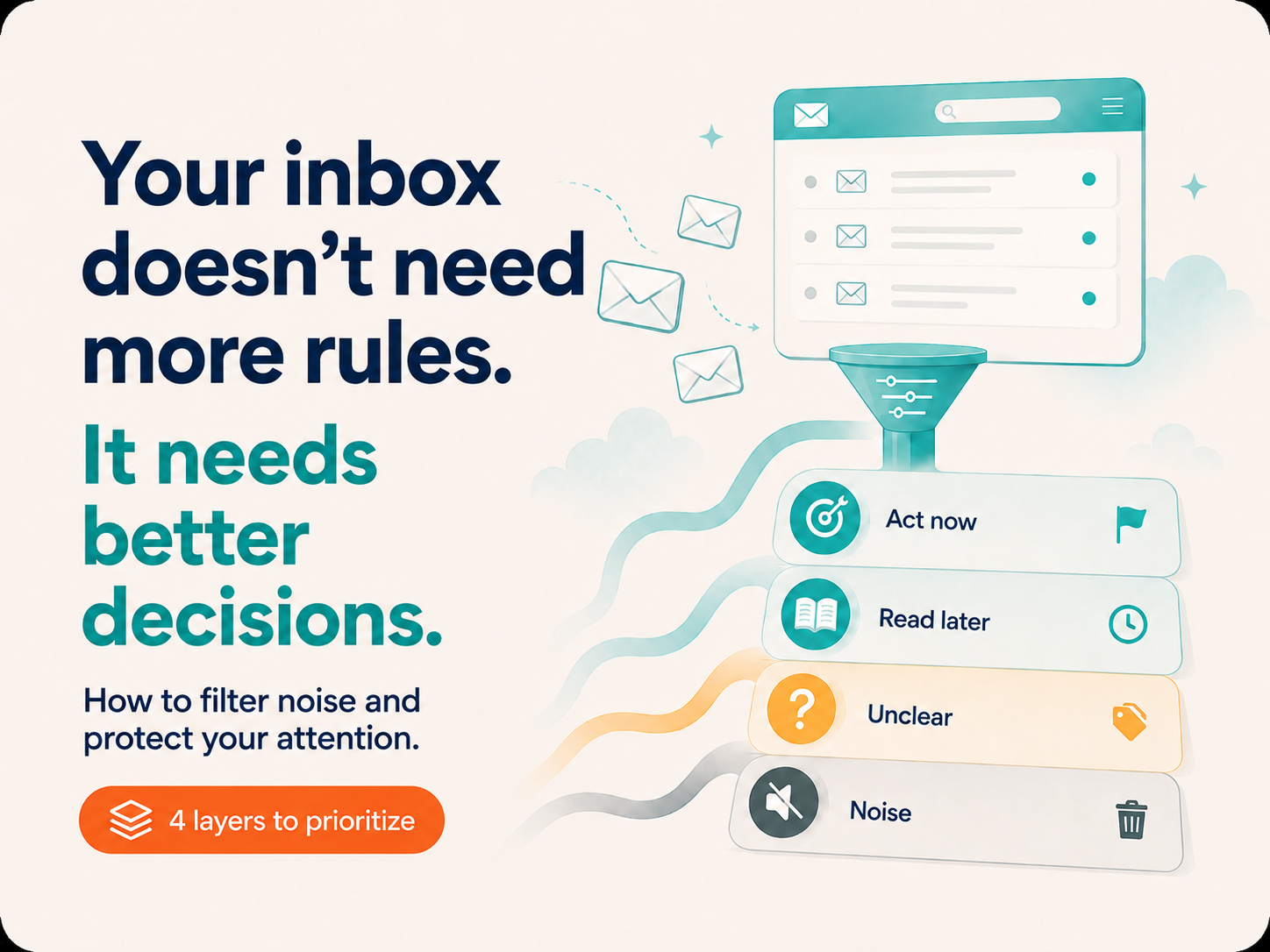
With that clear and in place, what I do now is add an agent layer that reviews my inbox each morning and separates messages into four levels.
I’ll share them with my examples, so read them as structure, not as a template. You can copy the four levels, but what goes inside each depends on what you do and who depends on you.
1. Act today. Anything that requires you to do something before the day ends. And here the important thing is not who it’s from, but what it asks of you:
- Open incidents and escalations: outages, “not working,” “blocked,” tickets that have broken SLA
- Emails from departments you’re directly dependent on: Product, Engineering, Sales, whoever it is in your case
- Active threads where you’re already involved and they’re waiting for your reply to move forward
- Requests from your manager or a client with a looming date
They’re tagged with a visible label so they don’t get lost among everything else. It’s the only block that interrupts.
2. Your domain, non-urgent. Metrics reports, project updates, internal communications, industry content… Everything you need to know but that doesn’t change if you read it tomorrow. Summarize by topic, not by sender, and group for a batch reading session.
This block recovers the most time because it’s the one that interrupts you most needlessly.
3. Doubtful. New senders or emails that don’t clearly fit any category. The system asks instead of assuming, and leaves them labeled for you to decide when you have five minutes.
4. Noise. Summarize in aggregate: how many there are and of what type, and delete with a single action.
The criteria are recalculated daily based on what arrived in the last 24 hours. It’s not a frozen list of good and bad senders, because tomorrow one may arrive that didn’t exist today and it needs to be flexible so you don’t spend sooo much time again.
What if “Act today” fills up?
This is the question that breaks the system, and I asked it building it: if you have eight open fronts with different departments and clients, that first block can come out with twenty items. And if a block is already so overloaded, you’re back to square one because you’ve created a second inbox, not a solution.
Four mechanisms that do work:
- Group by front, not by email. If you have 25 emails from 8 clients or projects, the system doesn’t show you 25 lines: it shows 8 fronts with their status. “Client A: incident open since Tuesday, awaiting response. Client B: two new emails, none requires action.” You go from 25 decisions to 8. When you have many fronts, your unit of work isn’t the email; it’s the front.
- Order, don’t just classify. The criterion isn’t “how urgent it seems” but what breaks if you don’t touch it today: what blocks someone else or breaks an SLA goes first, what degrades but holds goes after, and what only has an upcoming date goes last. An email with “URGENT” in the subject that no one expects is not urgent.
- Prioritize what unlocks others. If you’re someone’s bottleneck (an approval, a piece of data, a reply someone needs to move forward) that goes first even if it’s the shortest email of the day. Two minutes of yours can free four hours of someone else’s. This is the criterion with the most return and the one almost no one uses.
- Set a cap. Maximum five or six items in “Act today.” What doesn’t fit moves to “pending, no risk today.” Without a cap, the system doesn’t prioritize: it accumulates.
And now the uncomfortable part. If that block shows fifteen or twenty items day after day, that’s not a filtering problem; it’s the system showing a fact that already existed: you’re the single point of contact for too many fronts.
No automation fixes that, but what this does is make it visible and measurable, and turn it into a conversation about workload distribution instead of a diffuse fatigue you can’t explain.
The fifth layer, and where you really learn something
Then came the draft phase: preparing replies to emails that require a concrete response, and there I found what I believe is the real bottleneck of many of these systems.
Writing an email today isn’t hard. Now, with the help of AI we save many minutes, that’s true, although you have to provide the context over and over for each reply (the main current problem).
Therefore, the useful question isn’t “can AI write my emails, knowing that imitation?” but rather “what does it have access to when it writes them?”
To produce something usable you need, at minimum, four sources:
- The full thread, so you don’t repeat or contradict what’s already been said
- The calendar, if the reply implies a date. Without this the draft says “tell me when works for you” and hasn’t solved anything
- The system where the case lives: your CRM, ticketing system, project tool… to know where it stands
- Your voice and style document, so it sounds like you and not a generic assistant
If any of the four is missing, the draft becomes extra work disguised as help.
And there’s one rule I learned early: not everything deserves a draft. If you generate one for every email, the drafts folder becomes the new noise inbox. Drafts are worth it for predictable replies, like confirming, scheduling, sending a resource, acknowledging receipt with the next step.
What doesn’t deserve a draft are decisions you haven’t made yet, nor delicate conversations: negotiations, bad news, disagreements… In those cases, having a draft in front of you anchors you to the first phrasing instead of making you think.
This isn’t about Gmail
I built this system on Gmail because that’s what I use, but none of the above depends on that tool. In Microsoft 365 the approach is identical: Claude for Outlook triages the inbox and prepares drafts by crossing calendars, and for automation you have Power Automate as the native equivalent to Gmail filters, or Make and n8n if you prefer to build it externally.
The only thing that changes is the search syntax and folder names. The four layers, the classification criteria, and the context problem in drafts are exactly the same.
The same pattern across the operation
An inbox is just the most visible case. The pattern (incoming volume that exceeds the capacity to decide one by one) repeats across every department under the Operations umbrella.
I haven’t built all these systems in this instance but what follows is where the same design applies (though there could be many more), so you can identify your version:
| Department | The real noise | What the filter would do | The decision that stops being manual |
|---|---|---|---|
| Customer Success | Health score alerts where half are false positives: low usage due to client vacations, not risk | Cross the alert with context like upcoming renewal, history, or last contact before showing it. | “Is this alert real risk or noise?” |
| Support / Support Ops | Duplicate tickets, questions already answered in the KB, incidents mixed with a product outage | Group by known pattern, mark duplicates, escalate only what breaks SLA | “Is this new or have we seen it before?” |
| Onboarding | New client check-ins, mostly routine, some stuck at a critical step | Separate “in progress without action” from “blocked with risk of early churn” | “Is this client progressing or stalled?” |
| RevOps | Incoming leads, pipeline alerts, stage changes, CRM notifications | Prioritize by signal of intent and stage, not by arrival order | “Which lead do I call first?” |
| Operations Management | Business status scattered across email, Slack, CRM and dashboards | A briefing that crosses sources and orders by impact | “What needs my attention today?” |
| People Ops | Applications, internal requests, payroll incidents, time-off requests | Separate what requires human judgment from what’s a procedural request with a standard response | “Does a person decide this or a process?” |
| IT / Tech Ops | Monitoring alerts, most transient or already known | Group alerts from the same root incident, suppress recurring diagnosed ones | “Is this an incident or the same as always?” |
| PMO / Project Ops | Status updates from dozens of projects, mostly “no changes” | Highlight only deviations, blockers, and dependencies at risk | “Which project actually moved?” |
In all eight cases, the savings isn’t in executing faster, but in stopping the use of human judgment to decide what’s noise, because emails can be numbers, because emails arrive staggered — and this, besides wasting time, drains your attention.
And the draft layer applies the same: the reply to a recurring ticket, the QBR follow-up, the answer to an incoming lead, the response to a rejected candidate. With the same condition in all: a draft works if the system has access to the department’s source of truth. Without a connection to the CRM, the ticketing system, or the ATS, what comes out is well-written text that knows nothing.
How to find yours
You don’t need a consulting diagnosis to find yours. Four answered questions tell you if you have a case and of what type.
1. Which inbox do you open every morning knowing most of it won’t serve you?Don’t think only of email. It’s also the ticket queue, a Slack channel, CRM alerts, the monitoring panel. The signal is you open it out of obligation, not because you expect to find something.
To confirm, count: of the last 20 items that arrived there, how many required something from you? If fewer than six, you have a clear case. If fifteen, you don’t have a filtering problem: you have a workload problem, and the solution is different.
2. Can you explain in words how you discard?Write three rules, in plain language, as you’d tell someone new.
Good: “if it’s from monitoring and doesn’t mention production, it’s not urgent”. Bad: “it depends on how the week comes”.
If you need “it depends” more than twice, the criterion doesn’t exist yet: it’s in your intuition, not in your conscious head. And what you can’t explain can’t be automated. That’s the prior work, and it’s the work almost no one does.
3. Which error costs you more?A filter errs in two ways: marking as urgent something that wasn’t, or hiding something that did matter. They aren’t equal.
If the costly one is the second — missing an incident, a client at risk, a deadline — design with quarantine, never deletion: what the system can’t classify gets labeled and set aside but stays visible. If the costly one is the first, because it’s interrupting you unnecessarily, you can be much more aggressive.
This question decides whether the system will be used or abandoned. A filter that deletes without a safety net is discarded the first time it fails, and you never trust it again.
4. Where does the context needed to reply live?Take a typical email that does require a reply and list what you need to check to answer it: the thread, the calendar, the client record, the ticket status, the project document.
Now count how many of those systems are connected to each other. If it’s two out of five, the draft layer will fail and it’s better not to build it yet.
And if part of that context doesn’t live in any system (it’s in someone’s head, or what was said in a meeting that no one documented), no automation will fix it. That’s not an AI problem; it’s a problem of where you store information. It’s worth knowing before buying a tool that promises to solve it.
The answers to these four questions are worth more than any demo.
- The first tells you if there’s a case.
- The second, if you’re ready.
- The third, how to design it.
- The fourth, how far you can go today.
Start today, build it yourself in minutes.
It’s very simple to implement. Below are the steps:
- Open Claude and connect your mail: Gmail or Outlook, the connector activates with one click from the chat.
- Review what your current rules already solve and don’t duplicate them. This layer is for what they don’t reach.
- Paste the prompt below, adjust the brackets with your details and run it. You’ll see the result immediately.
- When the criteria convince you, go to the “Scheduled” section in the sidebar, create a new task, paste the same prompt there and choose the time. From that moment it runs automatically each morning.
Revisa mis correos sin leer de las últimas 24 horas y clasifícalos en cuatro niveles.

1. ACTÚA HOY — Lo que exige acción antes de que acabe el día:
   - Incidencias, escalados o cualquier cosa que mencione [caída, bloqueado, no funciona, SLA]
   - Correos de [DEPARTAMENTOS O PERSONAS DE LOS QUE DEPENDES]
   - Hilos donde ya estoy dentro y esperan mi respuesta para avanzar
   - Peticiones con fecha en los próximos [X] días
   Aplica la etiqueta "Actúa hoy". Máximo 6 elementos: si hay más, ordénalos por
   qué se rompe si no lo toco hoy, y lo que desbloquea a otra persona va primero.
   El resto pásalo a "Pendiente sin riesgo".
   Si hay varios correos del mismo frente o cliente, agrúpalos en una sola línea
   con su estado, no me los listes por separado.

2. MI ÁMBITO, SIN URGENCIA — Informes, actualizaciones de proyecto, comunicaciones
   internas, contenido de [TU SECTOR]. Resume por tema, no por remitente.
   Dime cuáles merecen lectura completa y cuáles pueden esperar a la sesión semanal.

3. DUDOSO — Remitentes nuevos o correos que no encajan claramente.
   Etiqueta "Revisar" y pregúntame qué hacer con cada uno. No asumas.

4. RUIDO — Promociones, notificaciones automáticas, eventos pasados.
   Resume en agregado por categoría, sin listarlos uno a uno.
   Dame la query de búsqueda lista para borrarlos todos de una vez.

Sé denso y sin relleno. Dame tu recomendación como asesor en cada bloque,
no te limites a describir.
What you have to decide before pasting it if you want to keep this dynamic are the bracketed items. And that’s the real work: who blocks you, which words mean urgency in your company, what your time horizon is. Half an hour thinking about that is worth more than any later technical tweak.
Run it manually three or four days. You’ll see it misclassifies some things, and that’s where you refine: add a sender, remove a keyword, adjust the limit. When two days in a row it seems correct, that’s when you schedule it.
And when the filter is reliable, add the fifth layer
This is the order that matters: if you build drafts before the filter is reliable, you end up generating replies for emails that shouldn’t even have reached your attention.
Three things to prepare first:
- Connect the context sources. Calendar for anything involving dates, CRM for known contacts, and the repository where your documents live. Every missing connector is a part of the draft that must be invented or left blank.
- Write your voice document. A page describing how you write: what tone you use, what words you avoid, how you open and close an email, when you use first-name informality. It’s what changes the result most and costs the least to create. Without this, drafts come out correct and generic, which is the worst combination possible: they don’t help you, but they’re not bad enough to discard quickly.
- Define what deserves a draft. I limited it to predictable replies: confirm, schedule, send a resource, acknowledge receipt with the next step. Everything else I do myself.
5. BORRADORES — Solo para los correos de ACTÚA HOY que piden una respuesta
   previsible: confirmar, agendar, enviar un recurso, acusar recibo con
   siguiente paso.

   Antes de redactar cada uno, consulta el hilo completo, mi calendario si
   implica fechas, y [TU CRM / GESTOR DE TICKETS] si es un contacto conocido.
   Usa mi documento de voz y estilo para el tono.

   Déjalos como borrador. No envíes nada.
   Y dime en qué te has basado para cada uno.

   NO generes borrador para decisiones que aún no he tomado, ni para
   negociaciones, malas noticias o desacuerdos.
That last instruction, “tell me what you based it on,” is what lets you audit whether the draft relied on something real or made it up. For an email that will go out with your name, that distinction is the whole difference.
What this really means
This isn’t about replying faster. It’s about deciding what deserves your attention.
Think of last week when you were late to something because it was buried among noise you didn’t see, and you spent time on a topic that had already been resolved through another channel. You read ten updates to “catch up” while another email waited, and that one did unblock someone’s work — they even mentioned in the meeting they were waiting for you to review it.
No one is measuring your email time, and it doesn’t show up on any report, but it takes a huge portion of your day.
The good thing? Like any repetitive work with an identifiable pattern, it can be designed and automated.
Now, and this is what almost no one says: the filter doesn’t reduce your work. It makes it visible and focuses you.
If building it reveals you have fifteen urgent things each day, the system didn’t create that problem; it brought it to light and gives you the tool to explain why you ended the day exhausted without having advanced anything concrete.
That’s the real value of systematizing judgment. It’s not that you work less; it’s that you can finally point to what’s eating your day.
Start by automating something small, something you can control like your channel, four levels, your categories, no-code, no transformation project, nothing to buy.
Because right now you’re filtering your focus with someone else’s rules. And that, even if it doesn’t show up on any report, is costing you money.
Artículos relacionados